
Welcome to the first deep-dive technical post in our Learning Palo Alto Next-Generation Firewall Series! If you missed our series introduction, we are building a complete, structured blueprint to take you from the foundational concepts all the way to passing your Palo Alto Networks Certified Network Security Professional (PCNSP) certification exam.
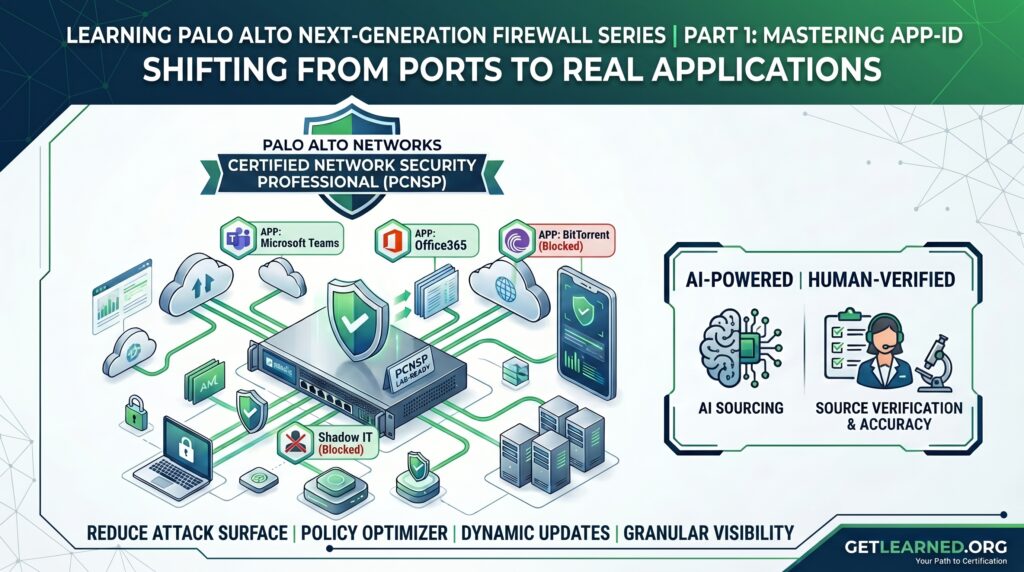
Today, we are tackling the foundational cornerstone of Palo Alto Networks’ security philosophy: App-ID.
If you’ve spent years managing legacy, traditional port-blocking firewalls, it’s time to shift your mindset. In the modern threat landscape, relying on Layer 3 and Layer 4 metrics (IPs and ports) to secure a network is like checking IDs at the door but letting guests wear masks inside.
Let’s look at how App-ID changes the game, reduces your attack surface, and helps you transition to a true positive-enforcement security model.
Before we dive into the technical content, a quick note on how this series is built: At GetLearned.org, we use advanced AI tooling like NotebookLM to ingest, organize, and synthesize massive amounts of engineering documentation and blueprint objectives. However, AI can make mistakes. That is why every line of code, architectural rule, and configuration methodology in this post has been rigorously vetted, fact-checked, and human-verified by an engineer with 30 years of industry experience. You get the speed of AI organization backed by the absolute certainty of real-world expertise.
The Problem with Legacy Port-Blocking
Traditional firewalls operate on a simple premise: if TCP port 80 or 443 is open, let the traffic through. The problem? Threat actors know this. Modern malware, peer-to-peer file sharing, and evasive applications routinely tunnel their traffic over standard web ports to bypass legacy security controls.
If you open TCP port 80, you aren’t just allowing clean HTTP web browsing; you might accidentally be letting data exfiltration, shadow IT applications, or command-and-control (C2) traffic slip right past your perimeter.
What is App-ID?
Palo Alto Networks built PAN-OS from the ground up to move past ports. App-ID is a patented traffic classification system that identifies the exact application running across your network, regardless of the port, protocol, or encryption being used. Instead of trusting that traffic on port 22 is SSH or traffic on port 443 is standard web browsing, App-ID continuously analyzes the data stream using multiple techniques:
- Application Signatures: Identifying unique behavioral characteristics and strings.
- Protocol Decoding: Stripping down the protocol to determine if the payload matches the expected formatting.
- Heuristics & Behavioral Analysis: Watching the traffic patterns for applications that try to hide via evasion techniques.
By knowing exactly what is running, you can drastically reduce your enterprise attack surface. You can explicitly allow “Office365” while blocking “BitTorrent,” even if both try to run over standard web ports.
Core Features of App-ID to Master for the PCNSP
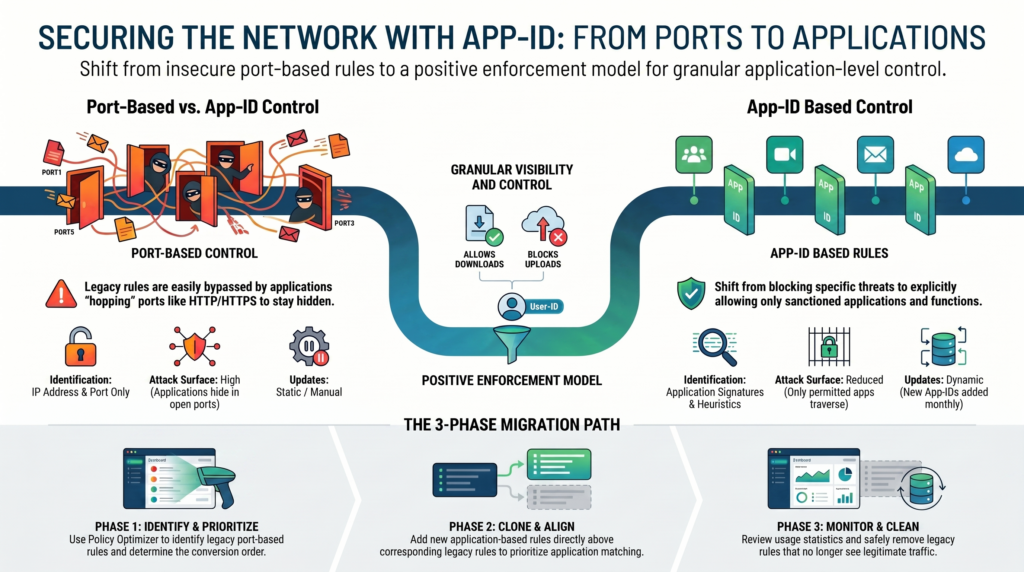
To succeed on the PCNSP exam and build an enterprise-grade security architecture, you need to understand the moving parts that make App-ID operational:
1. The Policy Optimizer: Migrating Legacy Rules
Transitioning from an old port-based firewall to a Next-Gen firewall can feel overwhelming. You can’t just guess what applications are running on your legacy rules. Palo Alto Networks solves this with the Policy Optimizer.
This built-in tool analyzes your existing port-based rules, monitors the actual application traffic hitting them over time, and allows you to seamlessly migrate those sloppy rules into clean, precise App-ID deployments without interrupting production traffic.
2. Dynamic Updates & Signature Management
Applications evolve daily. New features are added, and new software emerges constantly. Palo Alto Networks manages this by releasing Dynamic Updates. These are automated cloud-delivered packages that update your firewall’s signature database. As an administrator, you’ll learn how to safely stage and schedule these updates so your firewall can classify brand-new application risks the moment they appear in the wild.
3. Application Filters vs. Application Groups
Managing thousands of applications individually is an administrative nightmare. To stay organized, PAN-OS provides two primary methods:
- Application Groups: A static list of specific applications defined by the administrator (e.g., a group containing exactly Zoom, WebEx, and Microsoft Teams).
- Application Filters: A dynamic group based on characteristics. For example, you can create a filter for any application categorized as Business-Value: Low, Risk-Level: 5, and Category: Media. If a new app drops tomorrow matching those metrics, the firewall automatically adds it to the filter and blocks or monitors it instantly.
The Triad of Total Visibility: App-ID, User-ID, and SSL Decryption
App-ID is incredibly powerful on its own, but its true strength is unlocked when combined with User-ID and SSL Decryption.
Because a massive percentage of modern web traffic is encrypted via SSL/TLS, the firewall cannot see the application payload out of the box. By implementing SSL Decryption, you allow the firewall to safely inspect the cleartext stream.
Once decrypted, App-ID pinpoints exactly what software is running, and User-ID maps that traffic directly to a specific corporate identity or active directory group rather than just an anonymous IP address. This gives you granular visibility to say: “Allow the Marketing Team to post to corporate Facebook, but completely block the rest of the organization from using Facebook games or chat.”
Transitioning to a Positive-Enforcement Model
Ultimately, mastering App-ID allows your organization to shift to a positive-enforcement model. Instead of chasing bad actors and constantly writing “deny” rules for every new threat, you precisely define and sanction only the specific network activities required for business operations. If an application isn’t explicitly green-lit, it doesn’t pass.
This dramatic shrinking of the attack surface is exactly what keeps enterprise networks safe and is a massive component of the PCNSP curriculum.
What’s Next?
In our next post, App-ID: Securing the Network Through Application Identification, we will talk about …
Are you still managing port-based rules in your environment, or have you fully cut over to App-ID? Drop your questions, migration roadblocks, or study thoughts in the comments below!
🎬 Behind the Scenes: Curious how we break down massive technical topics into clear videos? We pair AI research tools with strict human oversight. See our “Human in the Loop” workflow.